SET NOCOUNT ON
GO

DECLARE @object_name SYSNAME
DECLARE @cmdstr NVARCHAR(300)
DECLARE @servername SYSNAME
DECLARE @instancename SYSNAME
DECLARE @inputfile NVARCHAR(128)
DECLARE @outputfile NVARCHAR(128)
DECLARE @prodsrvs TABLE(srvname sysname)

DECLARE crs_srv CURSOR
LOCAL
FAST_FORWARD
READ_ONLY
FOR
  SELECT srvname
  FROM @prodsrvs

INSERT INTO @prodsrvs(srvname)
SELECT 'Server-01'
UNION ALL SELECT 'Server-02'
UNION ALL SELECT 'Server-03'
UNION ALL SELECT 'Server-04'

OPEN crs_srv
FETCH NEXT FROM crs_srv INTO @servername

WHILE @@FETCH_STATUS=0
BEGIN

SELECT @cmdstr = 'sqlcmd -S ' + @servername + ' -i "\\PathToScript\Script.sql" -o "\\PathToScript\script_output.txt" '

EXEC dbo.xp_cmdshell @cmdstr
PRINT(@servername)

WAITFOR DELAY '00:00:05'

FETCH NEXT FROM crs_srv INTO @servername
END

CLOSE crs_srv
DEALLOCATE crs_srv

SET NOCOUNT OFF
GO
Showing posts with label SQL Server mirroring. Show all posts
Showing posts with label SQL Server mirroring. Show all posts
7/19/2012
Script deployment to multiple servers
I use the following script in order to deploy a T-SQL script to multiple servers:

6/12/2012
Easiest way to configure mirroring
First of all we need to restore database on Mirror server in NORECOVERY and apply all outstanding logs with NORECOVERY as well. In order to find all outstanding logs and generate RESTORE commands you may use the script from below:
/*
--------------------------------------
--Find all outstanding logs.
--Generate RESTORE WITH NORECOVERY commands and execute.
--------------------------------------
*/

DECLARE
 @dbname SYSNAME
,@mostrecentfull DATETIME
,@mostrecentdiff DATETIME
,@mostrecentdb DATETIME
,@logapplystartdate DATETIME
,@phydevice NVARCHAR(260)
,@errstat INT
,@sqlcmd VARCHAR(2048)

--db name set
SET @dbname='YourDBName'

SELECT @mostrecentdb = MAX(backup_start_date)
FROM msdb.dbo.backupset
WHERE (type='D' OR type='I')
AND database_name=@dbname

DECLARE crs_logstoapply CURSOR
LOCAL
FAST_FORWARD
FOR
 SELECT b.physical_device_name
 FROM msdb.dbo.backupmediafamily b INNER JOIN msdb.dbo.backupset s
 ON b.media_set_id = s.media_set_id
 WHERE s.type='L'
 AND s.database_name=@dbname
 AND s.backup_start_date >= @mostrecentdb
 ORDER BY s.backup_start_date ASC


OPEN crs_logstoapply

FETCH NEXT FROM crs_logstoapply INTO @phydevice

WHILE @@fetch_status=0
BEGIN

 --restore the next log
 PRINT 'RESTORE LOG ' + @dbname + ' FROM DISK=''' + @phydevice + ''' WITH NORECOVERY'

 FETCH NEXT FROM crs_logstoapply INTO @phydevice

END

CLOSE crs_logstoapply
DEALLOCATE crs_logstoapply
GO
The next steps are: Endpoint configuration and setting partners. We can use SQLCMD mode to configure these steps from one place. In order to enable SQLCMD mode go to your MSSMS menu Query->SQLCMD Mode. Then you may use the script from below, just modify database and server names
:SETVAR PrincipalServer PrincipalServerName01
:SETVAR MirrorServer MirrorServerName02
:SETVAR Database2Mirror YourDatabaseName
go


:ON ERROR EXIT
go

:CONNECT $(PrincipalServer)

CREATE ENDPOINT [Endpoint_Mirroring]
STATE=STARTED  --STARTED STOPPED DISABLED
AS TCP ( LISTENER_PORT = 5022 )
FOR DATABASE_MIRRORING
(
 AUTHENTICATION = WINDOWS NEGOTIATE  --NTLM KERBEROS NEGOTIATE

,ENCRYPTION = DISABLED  --DISABLED SUPPORTED REQUIRED
-- ALGORITHM --RC4, AES, AES RC4, or RC4 AES

,ROLE = PARTNER
)

USE master ;
GO

CREATE LOGIN [Somedomain\otherpartnerlogin] FROM WINDOWS ;
GO

-- Grant connect permissions on endpoint to login account

GRANT CONNECT ON ENDPOINT::Endpoint_Mirroring TO [Somedomain\otherpartneruser]; --unnecessary if the user is an Administrator
GO

:CONNECT $(MirrorServer)

CREATE ENDPOINT [Endpoint_Mirroring]
STATE=STARTED  --STARTED STOPPED DISABLED
AS TCP ( LISTENER_PORT = 5022 )
FOR DATABASE_MIRRORING
(
 AUTHENTICATION = WINDOWS NEGOTIATE  --NTLM KERBEROS NEGOTIATE

,ENCRYPTION = DISABLED  --DISABLED SUPPORTED REQUIRED
-- ALGORITHM --RC4, AES, AES RC4, or RC4 AES

,ROLE = PARTNER
)

USE master ;
GO

CREATE LOGIN [Somedomain\otherpartnerlogin] FROM WINDOWS ;
GO

-- Grant connect permissions on endpoint to login account

GRANT CONNECT ON ENDPOINT::Endpoint_Mirroring TO [Somedomain\otherpartneruser]; --unnecessary if the user is an Administrator
GO

:CONNECT $(MirrorServer)

ALTER DATABASE $(Database2Mirror)
SET PARTNER = 'TCP://PrincipalServerName01.yournetwork.com:5022'
GO

:CONNECT $(PrincipalServer)

ALTER DATABASE $(Database2Mirror)
SET PARTNER = 'TCP://MirrorServerName02.yournetwork.com:5022'
GO

:CONNECT $(PrincipalServer)

ALTER DATABASE $(Database2Mirror) SET PARTNER SAFETY OFF;
GO
6/11/2012
Database mirroring monitor displays "Not connected..." error
When you see the below error in your Database mirroring monitor that means that monitor cannt connect to mirror server.
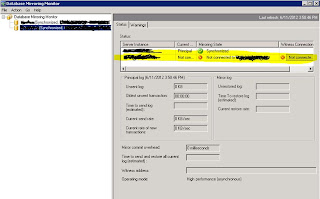 You need to do the following to fix that:

- Go to Menu->Action-> Manage Server Instance Connections
- Set up connection for each Server instance with user that have access to mirror server.
Subscribe to:
Posts (Atom)